LinkedIn Lead Gen Forms: How to Set Them Up for Qualified B2B Leads

Key Takeaways
- Lead Gen Forms pre-fill name, email, job title and company from the LinkedIn profile, and LinkedIn charges nothing extra for them beyond the ad spend.
- LinkedIn recommends three to four fields out of a maximum of 12; add one multiple-choice custom question to filter for budget, timeline or fit.
- Lead data in Campaign Manager is deleted after 90 days, so sync forms to your CRM before launch and send a test lead to prove it works.
- Prefilled forms make submitting easy, which also makes low-intent leads easy. Judge campaigns by cost per qualified lead and pipeline, not cost per form fill.
- Send qualified-lead data back through the Conversions API or CRM Sync so LinkedIn can optimize for leads that sales accepts.
LinkedIn Lead Gen Forms are pop-up forms attached to LinkedIn ads that pre-fill with the member's profile data, so a prospect can submit in a couple of taps without leaving LinkedIn. They cost nothing beyond the ad spend. Used well, with three or four fields, one qualifying question and a CRM sync, they produce B2B leads sales can work.
Most B2B teams try Lead Gen Forms because the cost per lead looks great in Campaign Manager. Then sales calls the list and finds that many of the leads do not remember filling anything in.
Both things are true, and the fix sits in how you build the form and what happens in the first hour after a submit. This guide walks through the setup step by step, with every rule taken from LinkedIn's own help documentation as of November 2026.
What Are LinkedIn Lead Gen Forms?
A Lead Gen Form is a form that opens on LinkedIn when someone clicks the call-to-action button on your ad. LinkedIn fills it in from the member's profile, so the prospect reviews the details and taps submit.
LinkedIn's Lead Gen Forms overview lists what each form can hold: up to 12 fields including up to three custom questions, hidden fields for tracking, a custom thank-you message with a call to action, CRM syncing and test leads. It also states there is no extra cost for the forms beyond the ads they are attached to.
Forms run under the lead generation objective. LinkedIn's lead generation objective page lists the supported formats as single image, carousel, video, event, document, message, conversation, and article and newsletter ads.
LinkedIn's best practices page adds that these ads are bought on a cost-per-click or cost-per-impression basis, and that cost-per-lead buying is not available. What you pay per click, and what that means per lead, is covered in our guide to LinkedIn ads cost.
How to Set Up a LinkedIn Lead Gen Form Step by Step
You can build a form inside the ad set flow or ahead of time as a reusable asset. Building it as an asset is cleaner, because you can attach the same form to several ad sets and compare them with hidden fields.
1. Create the Form and Write the Offer
LinkedIn's create a Lead Gen Form guide starts in Campaign Manager: open your ad account, click Content & Assets in the left menu, select Lead generation forms and click Create form.
Then set the form name, language, offer headline and details. LinkedIn's Lead Gen Form specs cap the offer headline at 60 characters and the offer detail at 160, so say exactly what the prospect gets: a demo, a benchmark report, a pricing call.
2. Choose Lead Details and Custom Questions
Pick the profile fields and up to three custom questions. The next section covers which ones to choose, because this is where lead quality is decided.
3. Add Your Privacy Policy and Consent Checkboxes
A valid privacy policy URL is required for approval. You can also add up to five disclosure checkboxes for specific consent, such as joining your newsletter, and they do not count toward the 12-field limit.
4. Build the Thank-You Page
The confirmation message holds up to 300 characters, and you can add a landing page link or an appointment booking link. LinkedIn says it will not deliver content for you, so if you promised a report, put an ungated link to it here or email it.
For demo offers, LinkedIn's appointment booking option lets a prospect pick a time right after submitting, using a Calendly or Chili Piper link. That turns a form fill into a booked meeting before anyone on your team lifts the phone.
5. Add Hidden Fields for Tracking
Under Settings, add hidden fields that pass campaign data into every lead record. The hidden fields page allows up to 20 per form, either static values or dynamic parameters such as CAMPAIGN_NAME, AD_SET_NAME and AD_NAME.
Pro tip: Add a static hidden field named lead_source with the value linkedin_lgf, plus dynamic CAMPAIGN_NAME and AD_NAME fields, before the form goes live. Hidden fields cannot be added to a form already attached to an active ad set, and without them you cannot tell which ad produced which deal.
6. Attach the Form, Connect Your CRM and Send a Test Lead
Create a campaign with the lead generation objective, choose your format, then select the saved form in the ad. Before launch, connect your CRM and send a test lead from the form library to confirm the record arrives with every field mapped.
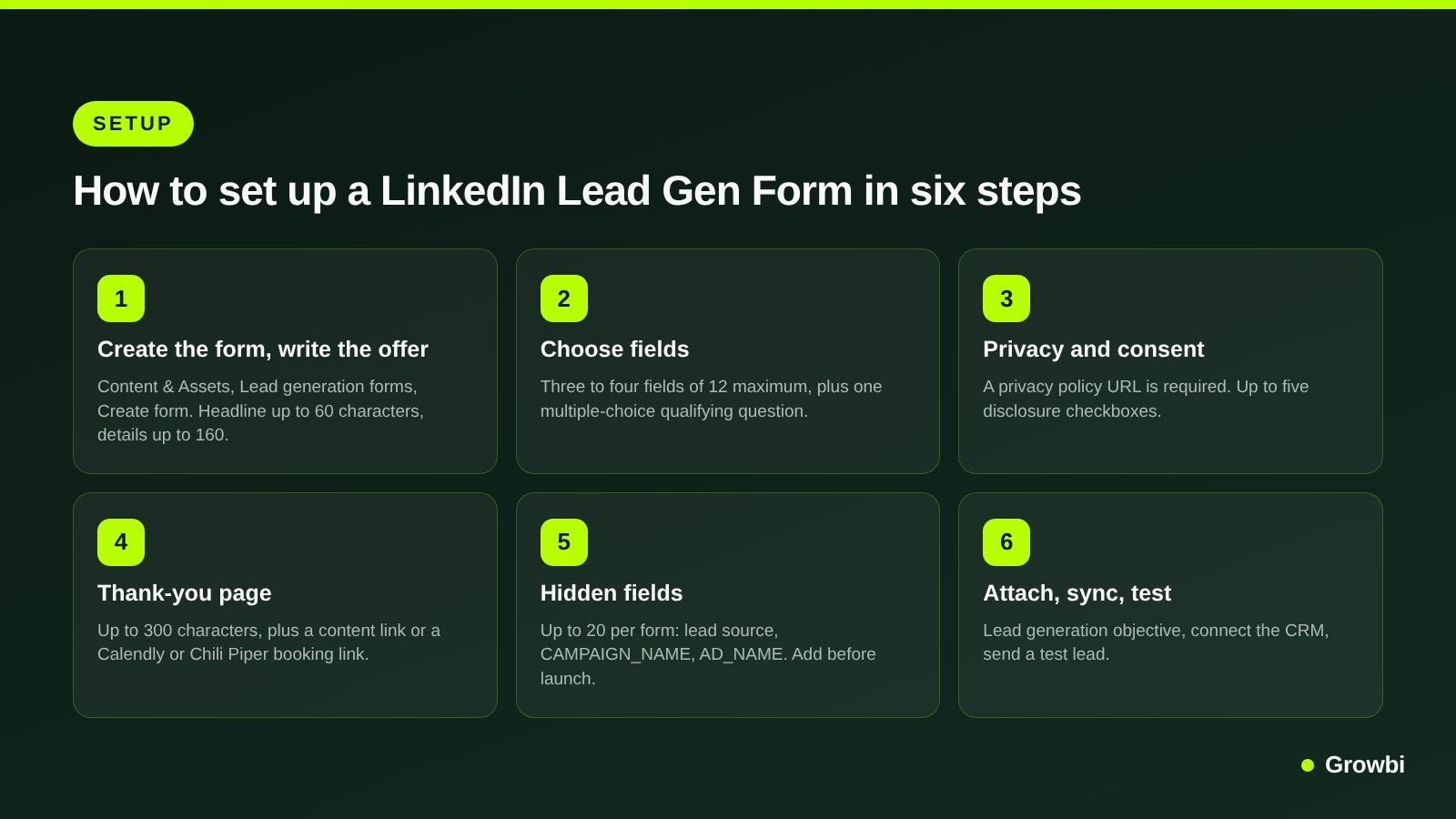
Source: Steps based on LinkedIn Marketing Solutions Help, Create Lead Gen Forms in Campaign Manager
Which Form Fields to Use: Volume vs Quality
Every field you add costs some volume and buys some information. LinkedIn's best practices recommend three to four fields, well under the maximum of 12.
The Lead Gen Form fields page explains why some fields hurt more than others. Fields the member has not filled in on their profile must be typed, gender is never pre-filled, and custom questions are always required. LinkedIn's own Lead Gen Forms guide says a single free-text custom question can cut submission rates by 3 to 4%.
A practical way to choose is to match the form to the offer:
- Content offer (report, checklist, benchmark): first name, last name, work email, company name. Fast to submit, low intent, best for building a nurture list.
- Webinar or event: the same four fields plus job title, so sales can see who attended from target accounts.
- Demo or consultation: first name, last name, work email, company name, job title, and one multiple-choice question such as company size, timeline or current tool.
- High-ticket service: the demo fields plus a work phone field and a booking link on the thank-you page. Fewer leads, but each one has asked to talk.
Pro tip: Make your qualifying question multiple choice, never free text, and put a neutral or disqualifying answer first. LinkedIn pre-selects the first answer by default, so if the first option is "Ready to buy this quarter", lazy submits will land there and pollute your data.
How to Sync LinkedIn Leads to Your CRM
Leads that sit in Campaign Manager are leads nobody calls. LinkedIn also deletes lead data after 90 days, according to its Lead Gen Forms guide, so a download-when-you-remember habit loses leads.
LinkedIn's CRM integration page points you to its partner directory, which includes HubSpot and Salesforce Sales Cloud. If your platform is not supported, you can download leads as a CSV and import them, checking that your CRM's custom fields match the CSV columns.
- Rename fields to match your CRM. LinkedIn lets you change how field names appear in downloads and syncs, per form, so they map without manual edits.
- Map hidden fields to CRM properties. Campaign and ad names should land in source fields your reports already use.
- Re-test after edits. If you edit a form while it is in draft, LinkedIn says you must update the account, form and field settings in your CRM before new test leads will sync.
- Route by owner. Use a hidden field or a CRM rule to assign each lead to a rep the moment it arrives.
Once leads land in the CRM, track what happens next, from meeting held to opportunity to closed deal. The logic is the same as in our guide to Google Ads conversion tracking: the ad platform should learn from customers, not form fills.
Speed to Lead: Follow Up Within Minutes
A Lead Gen Form submit is a short burst of attention. The prospect was scrolling, tapped your ad and went back to their feed, so they forget fast.
Harvard Business Review's study The Short Life of Online Sales Leads found that companies trying to contact a lead within an hour were nearly seven times as likely to qualify it as those that waited longer.
The practical target is a first contact within minutes during business hours. Our full guide to speed to lead covers the follow-up sequence in detail, and the same rules apply to B2B demo requests:
- Instant email: an automated message from the rep's own address within a minute, naming the offer and the next step.
- Same-hour call or LinkedIn message: during business hours, a human contact attempt inside the first hour, referencing the exact offer.
- A booking link in every touch: the thank-you page, the first email and the first message all carry the same calendar link.
- A short sequence, then a decision: several attempts across a week or so, then mark the lead as nurture or disqualified in the CRM so your qualified-lead data stays honest.
LinkedIn's best practices also ask you to state in the thank-you message how and when you will contact the lead. Then keep that promise.
Why Lead Gen Form Leads Are Low Quality and How to Fix It
Pre-filling is the strength and the weakness. Because submitting takes two taps, some people submit out of curiosity, by accident, or to get a report they will never read.
The symptoms are familiar: personal Gmail addresses, students and job seekers, wrong company sizes, and leads who do not pick up. These are the fixes that address each one:
- Ask for work email. The work email field is still editable by the member, but asking for it filters out many personal-address submits and makes enrichment easier.
- Add one qualifying question. A multiple-choice question about company size, budget range or timeline costs a little volume and tells sales who to call first.
- Match the offer to the intent you want. A free guide attracts readers; a demo, assessment or pricing call attracts buyers. Lead quality follows the offer more than the form.
- Tighten targeting. Exclude students, entry-level seniorities and job seekers where they are not buyers, and exclude existing customers with a contact list.
- Optimize for qualified leads. Send sales-accepted leads back to LinkedIn so delivery shifts toward people who look like them.
- Refresh forms and offers. LinkedIn's guide reports that only 10% of forms receive leads after their first 66 days in rotation.
LinkedIn's qualified leads optimization goal uses qualified-lead events from the Conversions API or CRM Sync, such as marketing qualified or sales qualified leads. LinkedIn notes your overall cost per lead may rise while cost per qualified lead falls, and recommends uploading five or more qualified leads within the two-week learning phase.
Here is an example, not data: you spend $10,000 and get 100 leads, a $100 cost per lead. If only 15 meet your criteria, the real figure is about $667 per qualified lead. A second campaign with a $150 cost per lead and 40 qualified leads out of 67 costs $250 per qualified lead, and is the better buy.
Pro tip: Never select qualified-lead events from both the Conversions API and CRM Sync on the same ad set. LinkedIn warns this double counts conversions; its auto-created CRM conversions carry an auto-created label, so check that every selected event either has it or does not.
Lead Gen Forms vs Sending Clicks to a Landing Page
LinkedIn reports an average Lead Gen Form conversion rate of 13%, against an average landing page conversion rate of 4.02% from an Unbounce study, in its Lead Gen Forms guide. These figures come from different datasets, so treat them as a direction rather than a forecast for your account.
Volume is not the whole decision. A landing page asks more effort but lets you explain the offer, show proof and qualify with copy, and LinkedIn's guide to Lead Gen Forms and conversion tracking notes that tracking site conversions needs the Insight Tag installed.
- Choose Lead Gen Forms when most of your audience is on mobile, the offer is simple to understand, you want to launch quickly, and your CRM sync and follow-up are ready.
- Choose a landing page when the offer needs explaining, you sell a high-ticket service where friction filters buyers, or you already convert well on your site and track it with the Insight Tag.
- Test both when budget allows: the same audience and offer, one ad set with a form and one with a landing page, judged on cost per qualified lead after enough leads to compare.
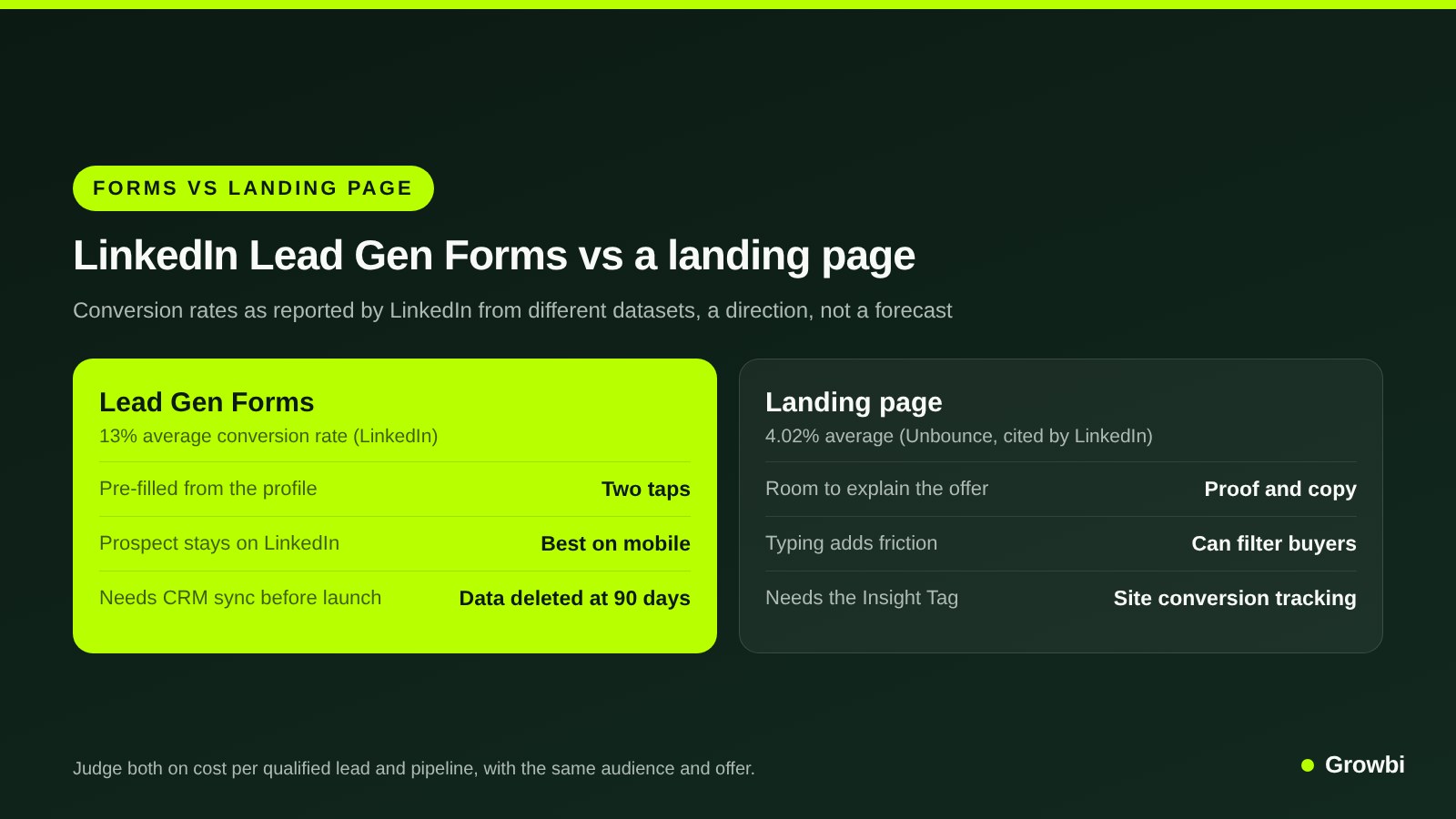
Source: Figures from LinkedIn Marketing Blog, How to Use LinkedIn Lead Gen Forms
Pro tip: On single image ads, LinkedIn suggests including a landing page URL in the intro text. On mobile a tap on the text opens the form, while on desktop it opens the page, so desktop researchers can read more before they commit.
LinkedIn is usually one part of a B2B paid mix. Our guide to B2B PPC shows how it fits next to search, where buyers are already looking for a solution.
If you also run lead forms on Meta, the same quality rules apply there. Our guide to Facebook ads costs shows why cost per lead and cost per customer can tell very different stories.
And if you are comparing LinkedIn against Google search budgets, our breakdown of how much Google Ads cost gives the click and lead benchmarks to put next to your LinkedIn numbers.
FAQs
What are LinkedIn Lead Gen Forms?
LinkedIn Lead Gen Forms are forms attached to LinkedIn ads that open when someone clicks the call-to-action button. They pre-fill with the member's profile data, such as name, email, job title and company, so the prospect can submit without leaving LinkedIn or typing. They work with formats such as single image, carousel, video, document and message ads.
Are LinkedIn Lead Gen Forms free?
Yes. LinkedIn states there is no additional cost for Lead Gen Forms beyond the cost of the ads they are attached to. You pay for the ad on a cost-per-click or cost-per-impression basis; LinkedIn does not offer cost-per-lead buying. Your cost per lead therefore depends on your bids, targeting and how many people complete the form.
How many fields should a LinkedIn Lead Gen Form have?
LinkedIn recommends three to four fields as best practice, with a maximum of 12 including up to three custom questions. Fields that are on the member's profile pre-fill automatically, while missing fields and free-text questions must be typed, which lowers completion. For demo offers, add one multiple-choice qualifying question rather than a long form.
How do I get LinkedIn Lead Gen Form leads into my CRM?
Connect your CRM or marketing automation platform through a LinkedIn integration partner such as HubSpot or Salesforce Sales Cloud, map the fields, and send a test lead before launch. If your platform is not supported, download leads as a CSV from Campaign Manager and import them. Do it often, because LinkedIn deletes lead data after 90 days.
Why are my LinkedIn Lead Gen Form leads low quality?
Pre-filled forms make submitting so easy that curious or accidental submits get through. Fix it by asking for work email, adding one multiple-choice qualifying question, offering a demo or assessment instead of a generic guide, tightening seniority and job-seeker exclusions, and sending qualified-lead data back to LinkedIn so it optimizes for leads sales accepts.
Are Lead Gen Forms better than a landing page on LinkedIn?
Lead Gen Forms usually produce more leads, and LinkedIn reports a 13% average conversion rate for them. A landing page converts fewer clicks but gives room to explain the offer and adds friction that can filter for buyers. The fair test is the same audience and offer on both, judged on cost per qualified lead.
Conclusion
LinkedIn Lead Gen Forms are the fastest way to turn a B2B ad click into a lead record. Keep the form to three or four fields plus one qualifying question, add hidden fields, sync to your CRM before launch and call within the hour.
Then judge the campaign on cost per qualified lead and pipeline, and feed qualified-lead data back to LinkedIn so it finds more buyers. That full loop, from ad to booked meeting to closed deal, is what the Growbi System is built around.
If you want to know what LinkedIn could add to your pipeline before you spend, get a free forecast and we will walk through the numbers with you.
Get this system built for your business
Book a strategy call and we will model a realistic appointment target from your budget, market, and offer.
Keep reading
How Much Do LinkedIn Ads Cost in 2026? CPC, CPL and Budgets
B2B PPC: How to Run Paid Search and Social That Builds Pipeline
Google Ads Conversion Tracking: From Calls and Forms to Booked Jobs
Speed to Lead: Why the First 5 Minutes Decide Who Books
How Much Do Facebook Ads Cost for a Local Business in 2026?
B2B Lead Generation Strategies: 9 Ways to Build Qualified Pipeline