Google Ads Conversion Tracking: From Calls and Forms to Booked Jobs

Key Takeaways
- Track calls first: most local leads phone in, and Google can count calls from call assets and from a forwarding number swapped onto your website.
- Count leads once per click. Website conversions default to Every in Google Ads, which inflates form leads unless you change it to One.
- Use either the Google Ads tag or a GA4 import as the primary form conversion, never both, or every lead is counted twice.
- Import booked jobs from your CRM within 90 days of the click, upload daily, and make that action primary after the longer of 3 conversion cycles or 4 weeks.
- Enhanced conversions and consent mode recover conversions that cookies miss, without sending unhashed customer data to Google.
Google Ads conversion tracking records the calls, forms and bookings that follow an ad click so Smart Bidding can find more of them. A local service business should track calls from ads and from its website, count each form once, then import booked jobs from its CRM so Google optimizes for customers, not clicks.
Most local accounts we look at track something, but rarely the right thing. Page views counted as leads, the same form counted twice, and calls not counted at all are the three most common setups, and each one teaches Google to buy the wrong clicks.
This guide is for owners of med spas, dental practices, home service companies and real estate teams. Every setting comes from Google Ads Help as of November 2026, and it ends with a 30-minute audit.
What Is Google Ads Conversion Tracking?
A conversion is an action you decide is valuable: a call, a form, a booking. Conversion tracking connects that action to the ad click that came before it.
That connection shows you which campaigns produce leads, and it feeds Smart Bidding, which sets bids by how likely each search is to convert. Without it, the cost per lead in our guide to Google Ads costs is a number you cannot measure.
Google's primary and secondary conversion actions page draws the line that matters most. Primary actions appear in the Conversions column and drive bidding. Secondary actions are observe only and appear under All conversions. Deciding which actions are primary is the single most important tracking decision in your account.
The Conversions a Local Service Business Should Track
Track the actions that a real customer takes on the way to a booked job, and nothing else.
- Calls from ads: people who tap the call button in your ad or location asset.
- Calls from your website: people who clicked an ad, landed on your site and then phoned.
- Form submits: quote requests, contact forms and consultation requests, counted when the form actually sends.
- Online bookings: appointments made through your booking tool after an ad click.
- Booked and completed jobs: imported later from your CRM or practice software, the action that tells Google which leads became customers.
For a plumber or HVAC company, calls are usually the bulk of leads. Our guide to Google Ads for plumbers explains how to build emergency campaigns around call assets so those calls can be measured from day one.
Pro tip: Name each conversion action by source and stage, such as Call from ad, Website form or CRM booked job, and mark the stage in the name too. Anyone opening Goals can then tell what bids from what observes without clicking into every action.
If you are still building the account, our Google Ads setup guide for small businesses covers campaigns, keywords and budgets first. This guide goes deeper on measurement.
How to Track Phone Calls From Google Ads
Google offers several call conversion types, and they measure different things.
Calls From Ads
Google's phone call conversion overview says calls from ads come from call assets, location assets and call-only ads, and require call reporting to be on in your account settings, which puts a Google forwarding number in your ad. You set a minimum call length, and only calls at least that long count.
Google now also offers AI call qualification. Its calls from ads setup page says that with call recording on, Google's AI analyzes the recording to judge lead quality, falling back to call length when a call cannot be recorded. Recording currently applies only when both parties are in the US or Canada.
Link your Google Business Profile too. With call history on, profile calls that follow an ad interaction are reported under Calls from ads.
Calls to the Number on Your Website
Most people who click an ad visit your site before they phone. To count those calls, a phone snippet swaps your number for a Google forwarding number for visitors who came from an ad.
Google's website call setup guide lists the details that break it in practice:
- Exact digits. The number you enter must match the digits on your site exactly.
- One number per page with the default JavaScript tag. Pages with several locations need the custom setup.
- Other call tracking tools. If your site already uses dynamic number insertion from another provider, Google cannot verify the number by scanning your code, so verify your domain instead.
- Testing. Click your own ad (you pay for the click), check that the number changes, and delete the gwcc cookie before testing again.
Google's forwarding number page adds two traps. Forwarding numbers belong to Google and can be reassigned, so never print one on a truck or a flyer. And phone systems that play early media, such as a tree that answers before the call connects, can make answered calls show as missed.
Clicks on Your Phone Number
A tap on a tel: link on your mobile site is the weakest signal. Google can only track the click, not whether a call happened, so keep it secondary.
How to Track Form Fills and Online Bookings
Forms are tracked with the Google tag, installed on every page directly or through Google Tag Manager, plus a conversion event that fires when the form is actually submitted.
- Fire on success, not on click. Trigger on the thank-you page or the form's success message, so failed or abandoned submissions do not count.
- Count one per click. Google's counting options page says Every is the default for website actions and One for calls. For leads, switch the form action to One, so a patient who submits twice is one lead.
- Booking widgets. Many scheduling tools load in an iframe or on their own domain, where your tag cannot see the confirmation. Ask the vendor for a Google Ads integration or a redirect to your own confirmation page.
- Pass the click ID. Add a hidden field that stores the GCLID from the landing page URL, so the lead record in your CRM carries it for the import step below.
Med spas and dental practices often run bookings through practice software that already has an integration. Our comparison of med spa CRM platforms notes which ones can pass booking data to ad platforms.
Pro tip: Check that auto-tagging is on in your account settings before you build the hidden GCLID field. Without it the gclid parameter never reaches your landing page URL, and the field stays empty on every lead.
GA4 Key Events vs the Google Ads Tag
You can count a form with the Google Ads tag or import it from Google Analytics 4 as a key event. Both work. Using both as primary is the classic duplicate.
Google's help page on GA4 conversions in Google Ads explains why the two never match exactly:
- Date. Google Ads credits the conversion to the day of the click, Analytics to the day of the conversion.
- Window. Google Ads conversion windows run from 1 to 90 days, while the Analytics cookie lasts up to 2 years.
- Delay. Imported Analytics conversions can take up to 24 hours to reach Google Ads, and history before the import is not backfilled.
- Default status. Conversions created from the Analytics side start as secondary and can only be made primary in Google Ads.
Our rule for local accounts: make the Google Ads tag primary for forms and keep the GA4 version secondary as a cross-check. If the two drift far apart, something is broken.
Enhanced Conversions and Consent Mode
Cookies miss conversions when people switch devices, block cookies or decline a banner. Two features close part of that gap.
Enhanced Conversions
Google's enhanced conversions page says the tag captures first-party data the customer typed in, such as an email or phone number, hashes it with SHA256 and sends the hash to Google, which matches it to signed-in Google accounts that engaged with your ad.
Enhanced conversions for leads uses the same hashed data to match leads you later mark as booked or sold in your CRM. Google says web and leads moved into a single on and off setting starting in April 2026.
Consent Mode
Consent mode passes your visitors' cookie choices to Google tags. It does not show a banner itself, so you still need a consent tool.
Google's consent mode page describes two versions. Basic blocks Google tags until a visitor accepts. Advanced loads the tags with consent denied and sends cookieless pings, which lets Google build a more detailed, advertiser-specific model of the conversions it cannot see.
If you advertise only in the US, consent mode matters less today than it does in Europe, but Google still expects you to get consent where the law or its policies require it.
Healthcare businesses should also keep treatment details and patient names out of conversion names and values, and have counsel review anything that sends patient data to an ad platform.
Offline Conversion Import: Optimize for Booked Jobs
Calls and forms tell Google who raised a hand. Only your CRM knows who booked, showed up and paid.
A campaign optimizing for forms learns to find people who fill in forms. A campaign optimizing for booked jobs learns to find people who book.
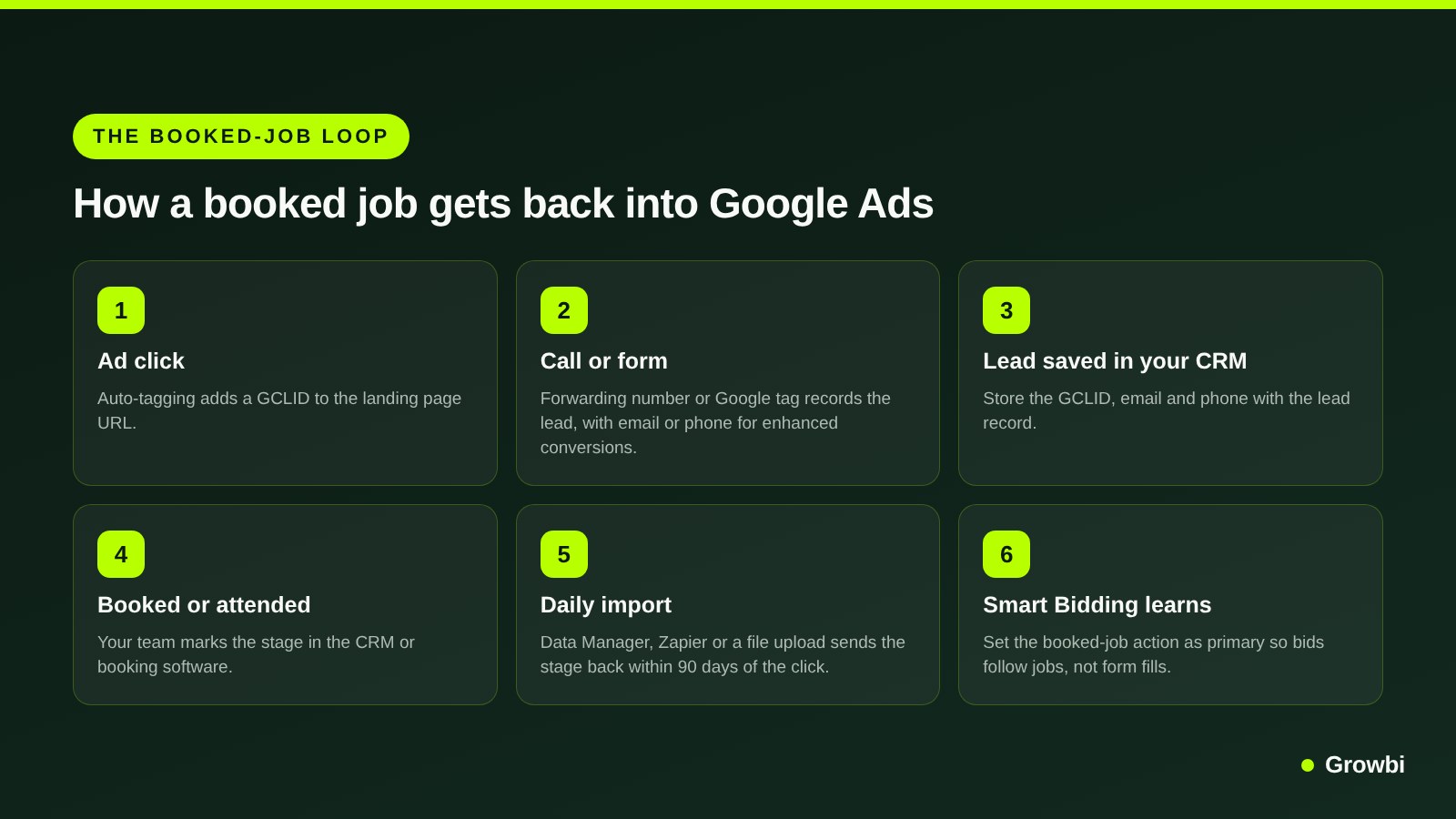
Source: Steps based on Google Ads Help, offline conversion imports FAQs
Google's offline conversion import FAQs set the rules. You can upload conversions with a GCLID up to 90 days after the click, and conversions matched on hashed customer data up to 63 days. You do not need a CRM, since a Google Sheet works, but Google recommends uploading at least daily.
- One action per stage. Create separate actions for booked, attended and sold, and bid on only one of them.
- Pick a stage with volume. If you book 40 jobs a month but sell 8 replacements, bid on booked jobs and keep sold as secondary.
- Add values. Upload the job or treatment value so you can later bid toward revenue, not just volume.
- Automate the upload. Data Manager, the Google Ads API, or Google's Zapier and Salesforce integrations can send conversions without manual work, and Data Manager also accepts files over SFTP.
Pro tip: Include the time zone in every conversion time you upload, in the format Google's import template shows, and use the time the job was booked, not the time you export the file. Wrong time zones are a quiet reason uploads get rejected or land on the wrong day.
Switch bidding over carefully. Google's guide to upgrading offline imports says to make the new action primary only after the longer of 3 conversion cycles or 4 weeks, and Google notes that Smart Bidding needs a 7 to 14 day learning phase after goal changes.
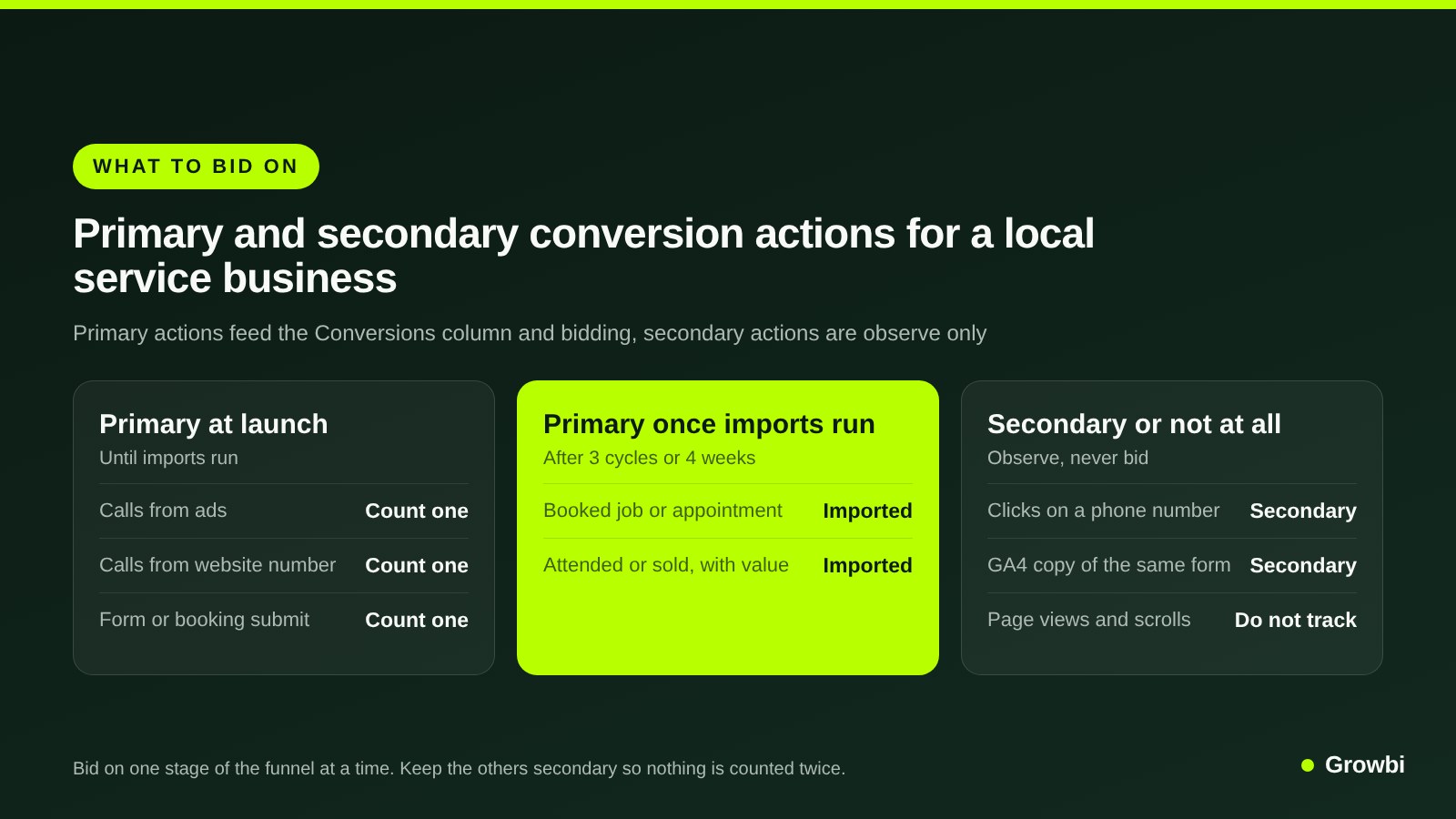
Source: Based on Google Ads Help, primary and secondary conversion actions
For dental practices, the most useful stage is often the first attended visit, the same number our guide to dental patient acquisition cost uses to compare channels.
Common Conversion Tracking Mistakes
These are the errors we find most often in local accounts.
- Counting page views as leads. A visit to the contact page is not a lead, and bidding on it buys browsers.
- Duplicate primaries. The Google Ads tag and a GA4 import of the same form, both primary, double every lead and make cost per lead look half of what it is.
- Forms counted as Every. One patient, three submits, three conversions.
- Call length too short. If a 10-second hang-up counts, so do wrong numbers. Set the minimum near the length of a real booking conversation, and use AI call qualification where it is available.
- Broken click IDs. Redirects or form tools that strip the GCLID make offline imports fail. Google says the GCLID must not be altered or dropped by your website.
- Constant goal changes. Every switch of the primary action restarts Smart Bidding's learning.
A 30-Minute Conversion Tracking Audit
Open Goals, then Summary, in your Google Ads account and work through this list.
- List every primary action. Anything that is not a call, a real form submit, a booking or an imported outcome should be secondary.
- Check for pairs. If the same form appears as a Google Ads tag and a GA4 import, demote one.
- Check the count setting on every lead action and set it to One.
- Confirm call reporting is on and the call length is set on Calls from ads and website calls.
- Test the website number swap from a real ad click, then clear the gwcc cookie.
- Submit a test form and confirm the conversion appears within a day and the GCLID lands in your CRM.
- Compare last month's conversions with the calls and forms your team actually logged. A gap of more than a few leads either way means something is miscounted.
Meta has its own version, the pixel and Conversions API, and the same rule applies. Our guide to Facebook ads costs shows how booked-customer data changes the math there.
FAQs
How do I set up conversion tracking in Google Ads?
In Google Ads, go to Goals, then Summary, and create a conversion action for each lead type: calls from ads, calls from your website, and form submits. Install the Google tag on every page, fire the form conversion on the success page, set lead actions to count One, and test each with a real ad click.
Can Google Ads track phone calls?
Yes. With call reporting on, Google puts a forwarding number in your call and location assets and counts calls that last longer than a minimum you set. A phone snippet can also swap your website number for a forwarding number for ad visitors. In the US and Canada, Google can also judge call quality from recordings.
Should I use GA4 or Google Ads conversion tracking?
Use one of them as the primary conversion for each action, not both. For local lead generation, the Google Ads tag is usually the better primary because it reports on Google Ads' click date and conversion window. Keep the GA4 key event as a secondary action to cross-check numbers.
What are enhanced conversions in Google Ads?
Enhanced conversions send a hashed copy of the email or phone number a customer enters on your site to Google, which matches it to signed-in Google accounts that saw or clicked your ad. It recovers conversions that cookies miss and lets you match leads later marked as booked or sold in your CRM.
How long does it take for Google Ads conversions to show?
Website call tracking can take up to an hour to switch on for your ads, and conversions imported from Google Analytics can take up to 24 hours to appear. For offline imports, Google recommends uploading at least daily. Smart Bidding then needs about 7 to 14 days to adjust after a goal change.
Why is Google Ads counting duplicate conversions?
The usual causes are the same form tracked by both the Google Ads tag and a GA4 import with both set to primary, lead actions counting Every instead of One, or a tag firing on page load instead of on a successful submit. For uploads, Google removes rows with the same click ID, action name and time.
Conclusion
Good conversion tracking for a local business is simple to describe: count calls, count each form once, keep one primary action per lead type, and send booked jobs back from your CRM within 90 days of the click.
Once Google can see which clicks became customers, Smart Bidding stops chasing form fills and starts chasing jobs. That is the setup our paid ads management starts every account with.
If you want a second pair of eyes on your conversion setup, book a free 15-minute call and we will walk through your Goals page with you.
Get this system built for your business
Book a strategy call and we will model a realistic appointment target from your budget, market, and offer.
Keep reading
How Much Do Google Ads Cost for a Local Business in 2026?
How Much Do Facebook Ads Cost for a Local Business in 2026?
Google Ads for Small Business: A Setup Guide for Local Services

Dental Google Ads: How to Run Campaigns That Book Patients
Google Ads for Plumbers: Emergency Calls, Costs and Campaign Setup
HVAC PPC: How to Run Google Ads, LSA and Meta for HVAC Calls