Google Ads for Small Business: A Setup Guide for Local Services

Key Takeaways
- Start with one Search campaign for one service and one area; add Local Services Ads if your trade is eligible, and leave Performance Max until conversion tracking is reliable.
- Use phrase and exact match while the account is new: Google says broad match, the default, needs Smart Bidding to work well.
- Set location to people in your service area, add a negative keyword list on day one, and run ads only when someone answers the phone.
- Track calls with Google forwarding numbers and a minimum call length, then mark which leads became booked jobs.
- Judge the first 90 days on cost per booked job, not clicks, and hire help when you cannot review search terms every week.
Google Ads works for a small local business when you start with one Search campaign for your most valuable service, use phrase and exact match keywords, block irrelevant searches with negatives, target only the area you serve, send clicks to a matching service page, and track every call and form to a booked job.
Most small businesses that give up on Google Ads did not fail because Google Ads does not work. They failed because the account ran on default settings: broad keywords, ads shown to people outside the service area, a homepage as the landing page and no way to tell which calls became paying jobs.
This guide is the setup we would want a local service owner to have before spending a dollar. It covers the account, the campaign type, keywords and negatives, location and schedule, ad copy, the landing page, tracking and the first 90 days. Budgets and click prices have their own guide, linked below, so this one stays on setup.
The examples use a plumber, a dentist and a med spa, but the steps are the same for HVAC, roofing, contractors and most appointment-based businesses.
Set Up the Account Before the First Campaign
Create the account under a business email you control, not a freelancer's login. If someone else ever runs it, give them access as a user; the account, its history and its conversion data stay yours.
- Switch to Expert Mode during sign-up if you want full Search controls. The simplified flow makes choices for you that are hard to see later.
- Link Google Business Profile so your address and hours can show with your ads, and so a future Local Services campaign syncs from the same listing.
- Add billing and verify the business before you build anything, so a pending verification does not hold your ads back on launch day.
- Ask about a promotional credit only through the sign-up flow or a Google Partner, since Google support cannot issue one on request.
New advertiser credits do exist. Google's promotional offers page says they usually require a set amount of spend within 60 days, followed by a verification period of up to 35 days, and an earned credit typically has to be used within 60 days. Treat it as a bonus, not a reason to pick a budget.
For what to budget, the click prices by trade and how to set a first monthly number, read our guide to how much Google Ads cost. This article assumes you have that number.
Choose Search, Local Services Ads or Performance Max
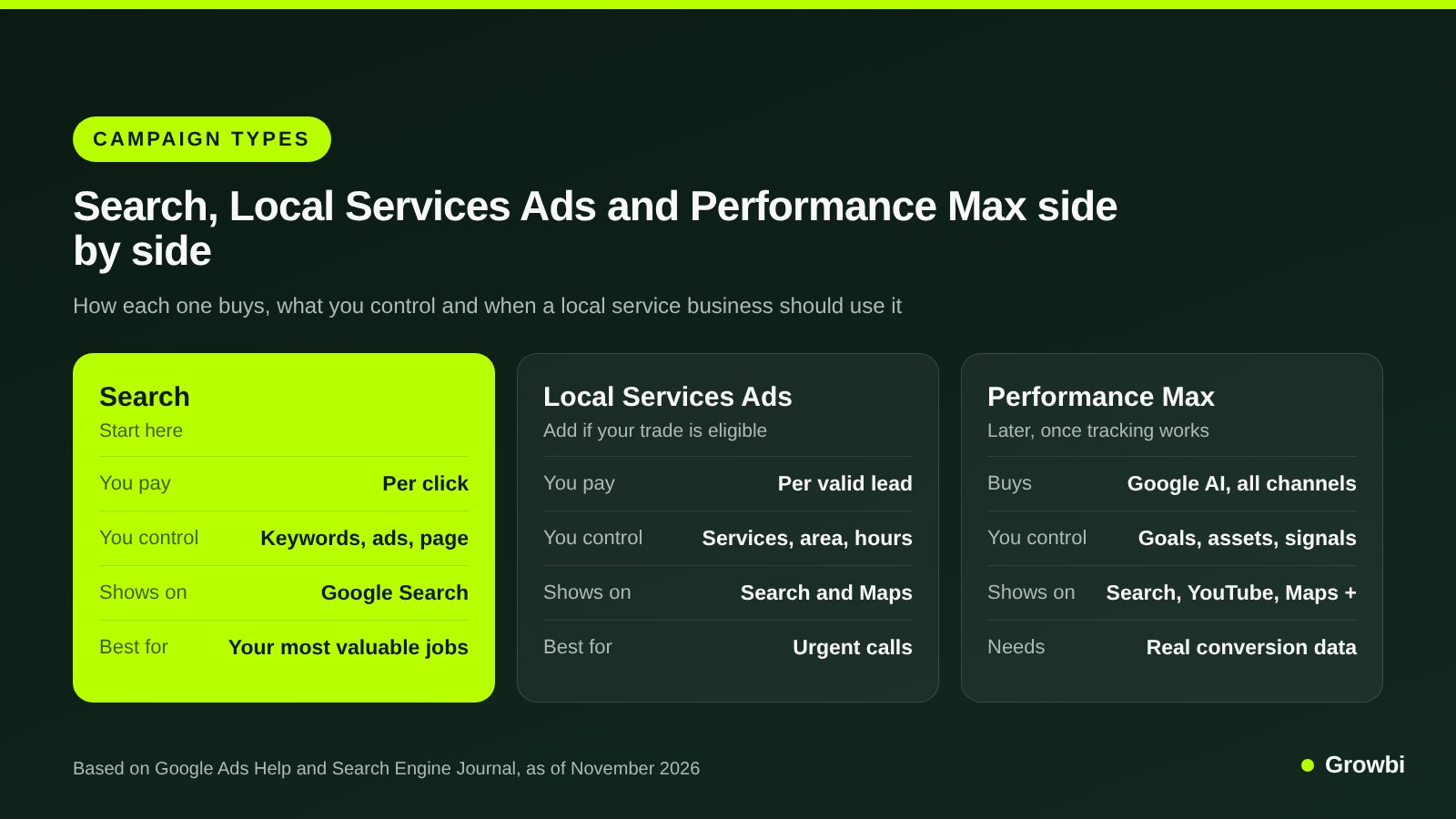
Google will suggest several campaign types. For a local service business, three matter, and they do different jobs.
- Search shows text ads on Google when someone types a query that matches your keywords. You pay per click and control the keywords, the ad and the landing page. This is where almost every small account should start.
- Local Services Ads sit at the top of results with a Google badge, and you pay per valid lead instead of per click. They exist only for eligible trades, and you cannot choose keywords or write the ad.
- Performance Max buys across Search, YouTube, Display, Discover, Gmail and Maps from one campaign, steered by your conversion goals. Without reliable conversion data it has little to learn from.
Source: Google Ads Help, About Performance Max campaigns; Search Engine Journal on Local Services Ads
Google's Performance Max overview describes it as a goal-based campaign that complements keyword Search campaigns. It also notes that a Search campaign with an exact match keyword identical to the query is served ahead of Performance Max, so the two can run side by side once you are ready.
Local Services Ads are changing shape in 2026. As Search Engine Journal reported, Google began moving them into Google Ads as pay-per-lead Performance Max campaigns in August 2026, with other accounts following through 2027. They stay keywordless, show only on Search and Maps, switch to a daily budget and lose manual bidding.
Our full guide to Google Local Services Ads covers eligibility, ranking and lead credits. Run them next to Search if your trade qualifies, not instead of it.
Pick Keywords and Match Types That Fit a Small Budget
Start with one service you want more of and the five to fifteen ways people search for it. A plumber who wants water heater jobs does not need drain, sewer and remodel keywords in the first campaign.
Match types decide how loosely Google can match your keyword to a search. According to Google's keyword matching options, broad match is the default and can match related searches, phrase match goes in quotes, and exact match goes in square brackets and gives you the most control. Google also says it is critical to use Smart Bidding with broad match.
On a new account with no conversion history, that makes phrase and exact the safer start. Here is what a first ad group for a plumber could look like:
- "water heater repair" and "water heater repair near me"
- "water heater installation" and "tankless water heater installation"
- [water heater replacement] and [no hot water plumber]
- "water heater repair" plus your city name, for searchers who type it
Group keywords by the page they should land on. Repair and installation can share an ad group if one page covers both; implants and cleanings at a dental office should not. Our dental Google Ads guide shows that split for a practice.
Add Negative Keywords From Day One
Negative keywords stop your ad from showing on searches you do not want to pay for. They are the cheapest fix in any small account.
Google's negative keyword rules have one trap: negatives do not match close variants, so you need to add plurals and synonyms yourself. You can also keep one account-level list that applies to every eligible campaign.
- Every trade: jobs, careers, hiring, salary, training, course, school, free, cheap, DIY, how to, youtube, reddit.
- Plumbing and HVAC: parts, wholesale, supply, home depot, lowes, manual, code, apprentice.
- Dental: assistant, hygienist jobs, school, free clinic, insurance jobs, dental lab.
- Med spa: at home, kit, course, certification, wholesale, side effects (review this one against your own search terms).
Then read the search terms report, which shows the real queries that triggered your ads, at least twice a week for the first month. Each irrelevant query you block is money that goes to a better one next week.
Pro tip: When a word is never useful to you, such as jobs or salary, add it once as a single-word broad match negative to the account-level list rather than blocking each full search term. One entry then covers every query that contains that word.
Set Location, Radius and Ad Schedule
Location is where small accounts leak the most money. The default reaches people in your area and people who have shown interest in it.
Google's location targeting help recommends broad "Presence or interest" targeting for Search, but says to consider "Presence" when you only want to reach people in your chosen locations. For a plumber who drives to the job, "Presence" is usually the right call.
- Target ZIP codes or cities you actually serve, or a radius around your shop. Google does not allow a radius under 1 km.
- Exclude areas you never drive to, such as the far side of a river or a county you dropped.
- Schedule ads for the hours someone answers. If calls go to voicemail after 6 pm, either stop the ads then or route them to an answering service.
- Turn off the Display Network in a Search campaign so your budget stays on search results.
Pro tip: After two weeks, open the locations report and look at where clicks actually came from. Any town that sends clicks but never a booked job goes on the excluded locations list, even if it sits inside your radius.
Emergency trades are the exception on hours. Our guide to Google Ads for plumbers covers 24/7 schedules and call assets for after-hours work.
Write Ads That Match the Search
Search ads today are responsive search ads. You give Google several headlines and descriptions, and it tests combinations.
Google's responsive search ads guide allows up to 15 headlines of 30 characters and up to 4 descriptions of 90 characters, with a minimum of 3 headlines and 2 descriptions. It recommends at least two responsive ads per ad group with Good or Excellent Ad Strength.
Write headlines that make sense in any order. A water heater ad group might use:
- Emergency Plumber in Austin
- Water Heater Repair Today
- Licensed and Insured Plumbers
- Upfront Price Before We Start
- Live Answer 24/7, Call Now
- Description: Same-day water heater repair across Austin. Upfront quote before any work begins.
Put the service and the city in the headlines, one proof point such as licensing or reviews, and one reason to call now. Pin a headline only when it must always show, such as a required disclaimer, because pinning reduces the combinations Google can test.
Add assets as well: a call asset with your tracked number, sitelinks to two or three service pages, callouts like "Same-day service" and a location asset from your Business Profile.
Pro tip: Give the call asset its own schedule that matches the hours a person answers your phone. Outside those hours the ad still shows sitelinks and sends people to the form, instead of a number that rings out.
Med spas and dentists have extra copy rules. Google restricts prescription drug terms in ads, so neurotoxin brand names stay out; our comparison of Google and Meta for med spas explains the workarounds.
Send Clicks to a Page Built for One Service
Your homepage talks to everyone. A landing page for an ad talks to the person who just searched "water heater repair near me" and wants to know three things: can you do it, when, and how do I reach you.
- Headline that repeats the search, such as Water Heater Repair in Austin, Same Day.
- A tap-to-call number and a short form visible without scrolling on a phone.
- Proof: license number, real reviews, photos of your team and vans, not stock images.
- What happens next: who calls back, how fast, and whether there is a trip fee or free estimate.
- Speed: a page that loads slowly on mobile loses the click you already paid for.
If your site has no page per service, build one for the first campaign before launch. The same rules apply to clinics, as our guide to dental practice website design shows for treatment pages.
Track Calls and Forms to Booked Jobs
Without tracking you cannot tell a good keyword from a bad one, and any automated bidding later will optimize for the wrong thing.
Set up at least three conversion actions: calls from the ad itself, calls from your website after an ad click, and form submissions. Google's website call tracking setup uses free Google forwarding numbers that replace your number on the site, and counts a call as a conversion only when it lasts longer than a minimum length you set.
Set that minimum high enough to filter wrong numbers and quick hang-ups, then listen to a sample of calls to check the threshold fits your business.
The next step is the one most small accounts skip: telling Google which leads became customers. Google's enhanced conversions for leads sends hashed lead details from your form and lets you import the conversion later, when the lead turns into a customer in your CRM.
Even without that integration, keep a simple sheet: date, source, keyword or campaign, booked yes or no, job value. That sheet gives you cost per booked job, the only number that tells you whether to spend more.
Your First 30, 60 and 90 Days
The first three months are about learning which searches turn into jobs. Expect the first month to cost more per lead than later ones.
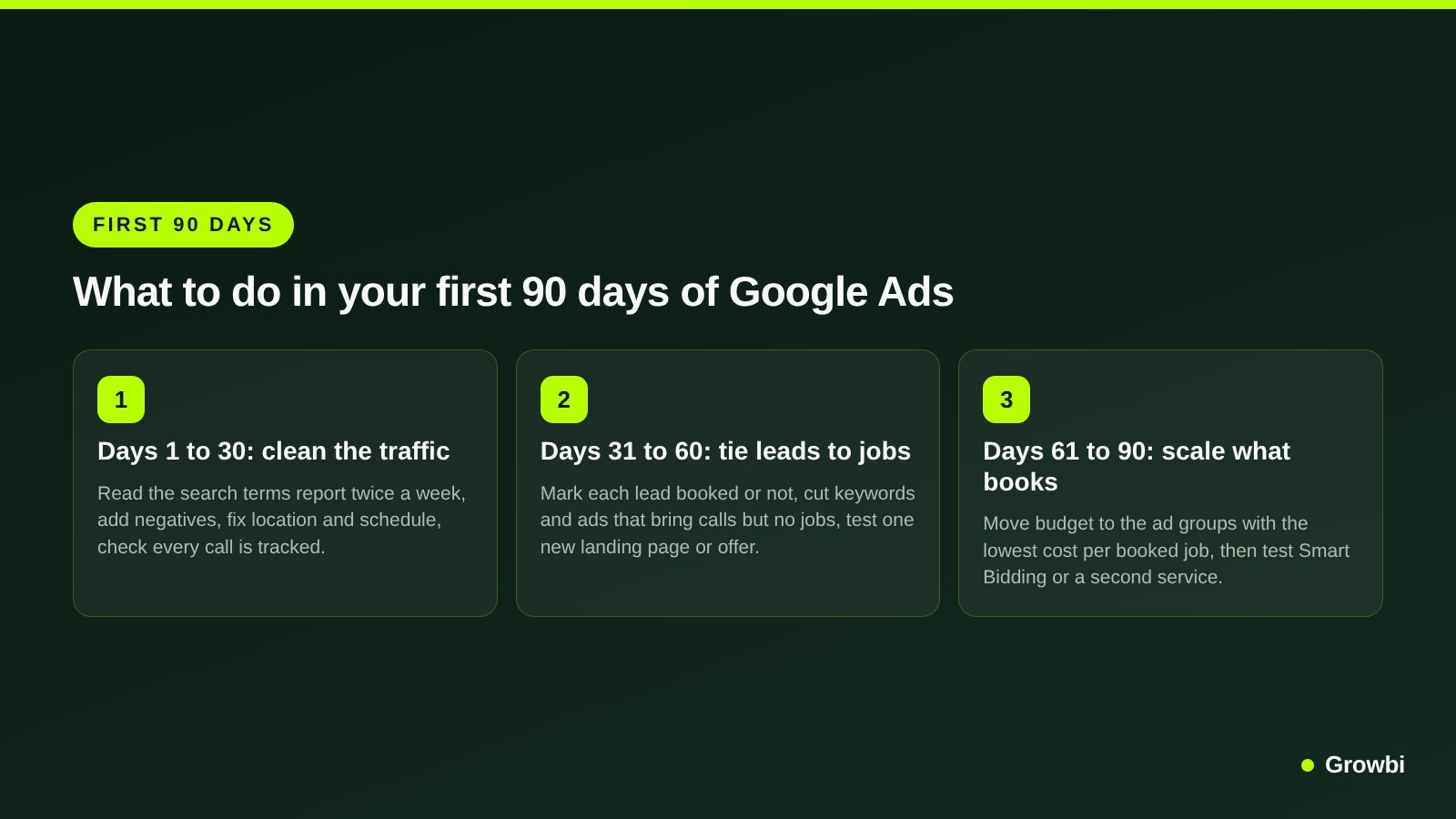
Days 1 to 30: Clean the Traffic
Read search terms twice a week and add negatives. Check that every call and form appears in conversions. Fix location, schedule and any ad or keyword Google flags as limited.
Days 31 to 60: Tie Leads to Jobs
Mark every lead as booked or not. Pause keywords and ads that bring calls but no jobs, and test one change at a time: a new offer, a new headline set or a better landing page.
Answer speed matters as much as any setting here. Our research on speed to lead explains why a callback in minutes books more of the same leads.
Days 61 to 90: Scale What Books
Move budget to the ad groups with the lowest cost per booked job. Once you have steady conversions, test Smart Bidding such as Maximize conversions, or a second service, or Performance Max with your best-performing assets.
When to Hire Help With Google Ads
Running your own account is realistic when you have one service, one area and an hour a week to read search terms. It gets hard fast after that.
- You cannot review search terms weekly, and the account keeps paying for jobs you do not do.
- You do not know your cost per booked job, because calls and forms are not tied to outcomes.
- You run several services or cities, each needing its own keywords, pages and budget.
- You are in a regulated category, such as med spa, dental or real estate, where policy mistakes get ads disapproved.
- Your current agency reports clicks and impressions but never booked jobs.
Whoever you hire, keep the account in your name and ask for reporting on cost per booked job. Our checklist for choosing a Google Ads agency for home services lists the questions to ask before you sign.
FAQs
How do I advertise my business on Google?
Create a Google Ads account in your business's name, link your Google Business Profile and set up conversion tracking for calls and forms. Then build one Search campaign for your most valuable service, with phrase and exact match keywords, a negative keyword list, location set to your service area and ads that send clicks to a matching service page.
Should a small business use Performance Max?
Not as a first campaign. Performance Max buys across Search, YouTube, Display, Discover, Gmail and Maps and optimizes toward your conversion goals, so it needs reliable conversion data to work. Start with Search, track calls and forms to booked jobs, and test Performance Max once the account records conversions steadily.
Which keyword match type is best for a small business?
Phrase and exact match are the safer start for a new account. Broad match is Google's default and can match related searches, and Google says it should be paired with Smart Bidding. Without conversion history, broad match tends to spend on loosely related searches, so add it later and watch the search terms report.
How do I claim $500 in Google Ads credit?
Promotional credits are offered to new advertisers at sign-up or through Google Partners, not through support. Google's help page says they typically require a set spend within 60 days, then an up to 35-day check that you are new to Google Ads, and the credit is usually valid for 60 days. Read each offer's terms.
How long does it take for Google Ads to work?
Ads can bring calls on the first day, but judging a campaign takes longer. Plan on about 90 days: the first month to clean search terms and fix tracking, the second to tie leads to booked jobs, and the third to move budget toward the keywords and ads with the lowest cost per booked job.
Conclusion
Google Ads works for small local businesses when the setup is narrow and measured: one service, one area, phrase and exact keywords, a negative list, a page built for the search and tracking that ends at a booked job.
Keep the account in your name, read the search terms every week and judge every change on cost per booked job. If you would rather have that work done for you, our paid ads management is built around that number.
Want a second pair of eyes on your setup before you spend? Book a free 15-minute call and bring your service list and last month's leads.
Get this system built for your business
Book a strategy call and we will model a realistic appointment target from your budget, market, and offer.
Keep reading
How Much Do Google Ads Cost for a Local Business in 2026?
Google Local Services Ads: Cost per Lead, Ranking Factors and Setup
Google Ads for Plumbers: Emergency Calls, Costs and Campaign Setup

Dental Google Ads: How to Run Campaigns That Book Patients

Best Google Ads Agency for Home Services
Speed to Lead: Why the First 5 Minutes Decide Who Books