Google Local Services Ads: Cost, Setup and How to Rank Higher
 Mor RomanoCTO, Growbi12 min read
Key Takeaways
- You pay per valid lead, not per click, and Google publishes no official cost-per-lead benchmark.
- Since October 1, 2026, missed calls during business hours that last over 20 seconds can be billed.
- Local Services Ads are moving into Google Ads as Performance Max campaigns with pay-per-lead goals, in phases from August 2026.
- Ranking depends on bid, responsiveness, rating, review count and profile quality, so answering the phone is now a ranking and a cost lever.
Google Local Services Ads are pay-per-lead ads that sit at the top of Google Search and Maps with a Google Verified badge. You pay for calls, messages and bookings, not clicks. Home services leads averaged roughly $53 to $63 in 2026 trackers, and ranking depends on your bid, responsiveness, reviews and profile quality.
Table of Contents
Search for a plumber, an HVAC repair or a roofer in most US cities and the first thing you see is not a website. It is a row of businesses with a Google Verified badge, star ratings and a call button. Those are Local Services Ads, and they take the first look from every homeowner with an urgent problem.
This fall the rules moved under contractors' feet. Since October 1, a call your office lets ring out can show up on the invoice, the dashboard you know is being retired, and manual bids are on their way out.
Below are the current costs by trade, what actually moves your position, and the setup we use so these calls become jobs on the board.
What Are Google Local Services Ads?
Google Local Services Ads (LSA) are pay-per-lead ads for local service businesses. They appear above the regular search ads and in Google Maps, and customers can call, message or book directly from the ad.
Businesses that pass Google's screening get the Google Verified badge, which shows the checks a business completed, such as license and background checks for the owner and field staff. According to Google's Local Services Ads overview, you pay only for leads related to your business and the services you offer.
- You pay for. Local Services Ads: A valid lead: call, message or booking; Google Search ads: A click to your website
- Targeting. Local Services Ads: Service categories and service area, no keywords; Google Search ads: Keywords you choose
- Where it shows. Local Services Ads: Top of Search and Google Maps; Google Search ads: Search results below LSA
- Trust signal. Local Services Ads: Google Verified badge and reviews; Google Search ads: Your ad copy and extensions
- Landing page needed. Local Services Ads: No, the profile is the page; Google Search ads: Yes
- Control. Local Services Ads: Low, Google matches the jobs; Google Search ads: High, you choose every term
LSA is available for home services such as plumbing, HVAC, electrical, roofing, pest control and moving, and for some professional and health care categories. Booking leads are not offered in health care, so dentists and clinics receive calls and messages only.
How Much Local Services Ads Cost in 2026
There is no official price list. Each lead is priced in an auction against similar businesses, so cost moves with your trade, your city and the season.
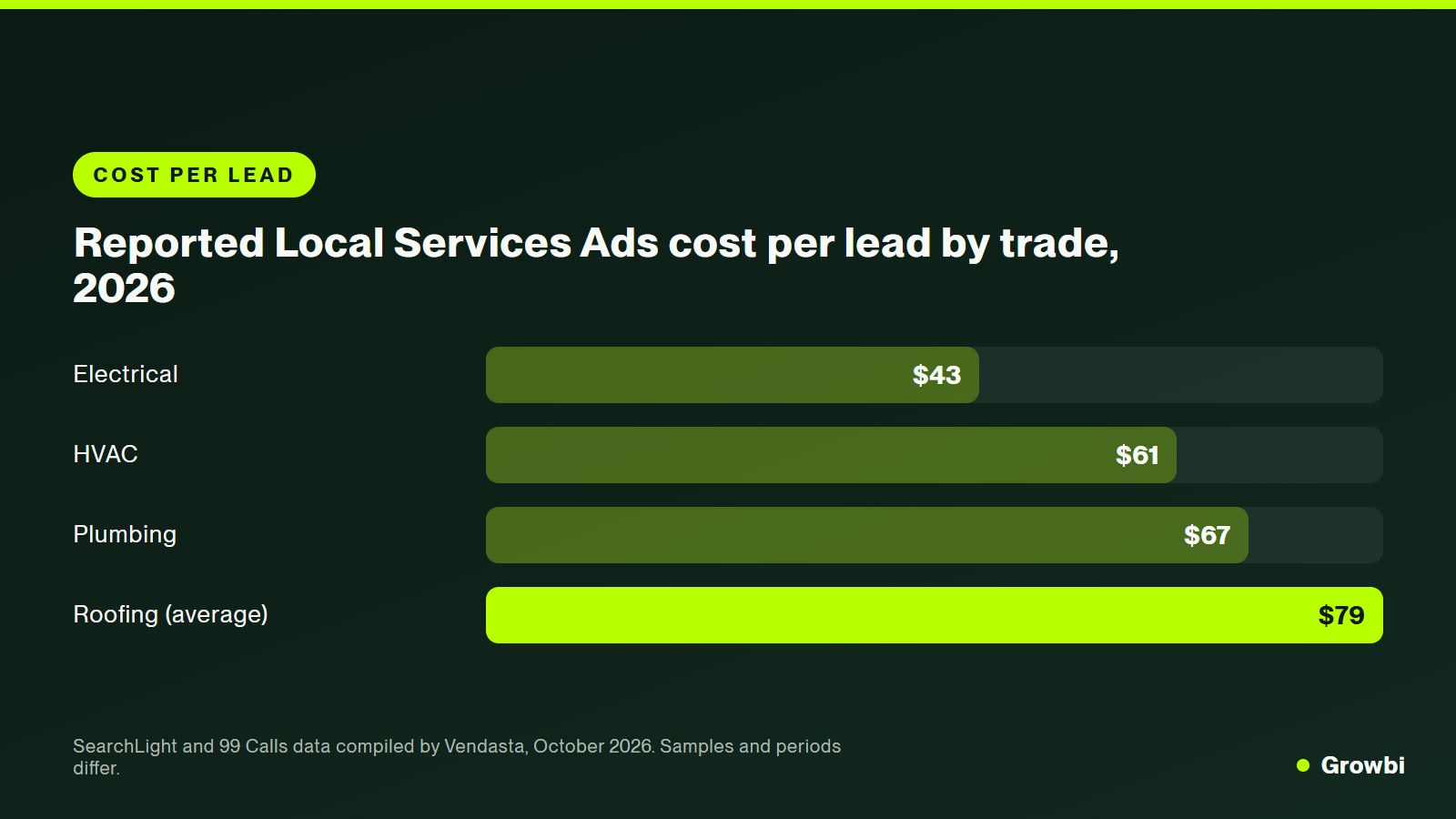
Google publishes no cost-per-lead benchmark, so the best numbers come from trackers that see many accounts. Vendasta's October 2026 LSA guide compiles the most recent ones: SearchLight's September 2026 benchmark put the cost per unique lead at $62.88 across its contractor cohort, up from an average of $53 in its February 2026 data.
- Electrical. Cost per lead: $43.15; Source and period: 99 Calls, April to June 2026
- HVAC. Cost per lead: $60.66; Source and period: SearchLight, September 2026
- Plumbing. Cost per lead: $67.05; Source and period: SearchLight, September 2026
- Roofing. Cost per lead: $79 average, $72 median; Source and period: SearchLight, Q1 2026
- Roofing. Cost per lead: $106.87; Source and period: 99 Calls, April to June 2026
- All home services. Cost per lead: $62.88; Source and period: SearchLight, September 2026
Source: Vendasta, compiling SearchLight and 99 Calls data (October 2026)
Cost per lead is not the number that pays the bills. A $60 lead that books 45% of the time costs about $133 per booked job. The same lead booking 20% of the time costs $300. The gap between those two numbers is decided by how fast your office answers, not by Google.
The Leads Google Charges You For
A lead is a customer contact that comes from your ad: a phone call, a message or a booking. Google charges for valid leads tied to the services you offer, and its automated systems review leads and credit the ones it judges invalid.
The rules tightened on October 1, 2026. Google emailed advertisers that it would start charging for certain missed calls and follow-up calls, as reported by Search Engine Roundtable.
- Missed calls during business hours can be charged when the caller stays on the line for more than 20 seconds.
- Follow-up calls can be charged when the first call was not chargeable but a later call with the same person meets the valid lead criteria.
- Phone menus: if callers must press a key to reach you, the 20-second timer starts at the key press, and callers who hang up without pressing are not charged.
- 15-day window: Google's Ads Liaison clarified that repeat contact with the same person within 15 days is charged only once. Contact after that counts as a new lead.
The practical meaning is simple. Every unanswered call during your listed business hours may now be a paid lead that you lose to a competitor. Set your ad schedule to the hours someone actually answers the phone.
How Local Services Ads Are Moving Into Performance Max
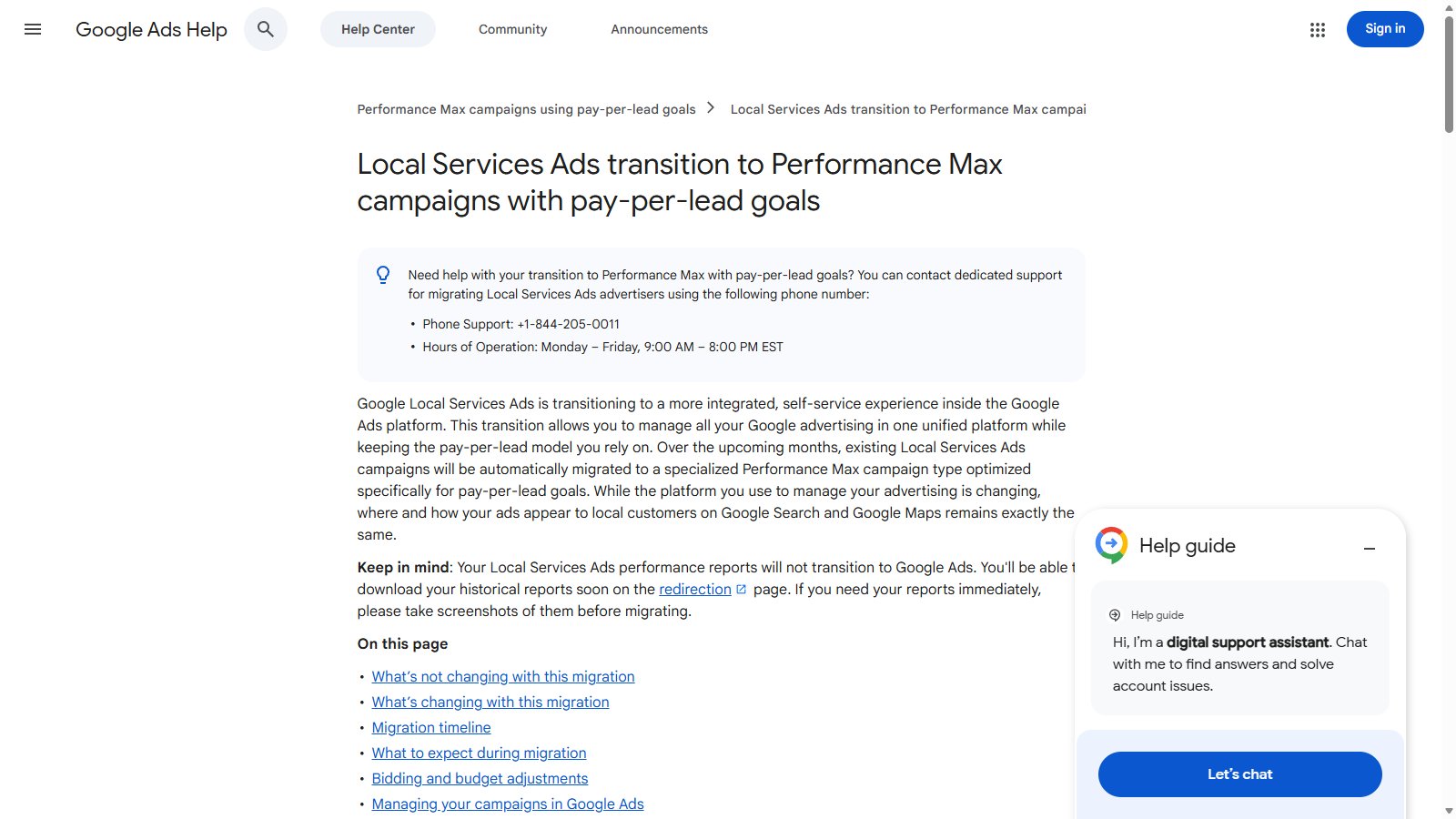
Google is retiring the standalone Local Services Ads dashboard and moving campaigns into Google Ads as Performance Max campaigns with pay-per-lead goals. You still pay per lead, and ads still show only on Search and Maps in the same positions.
Source: Google Ads Help, Local Services Ads transition to Performance Max campaigns with pay-per-lead goals
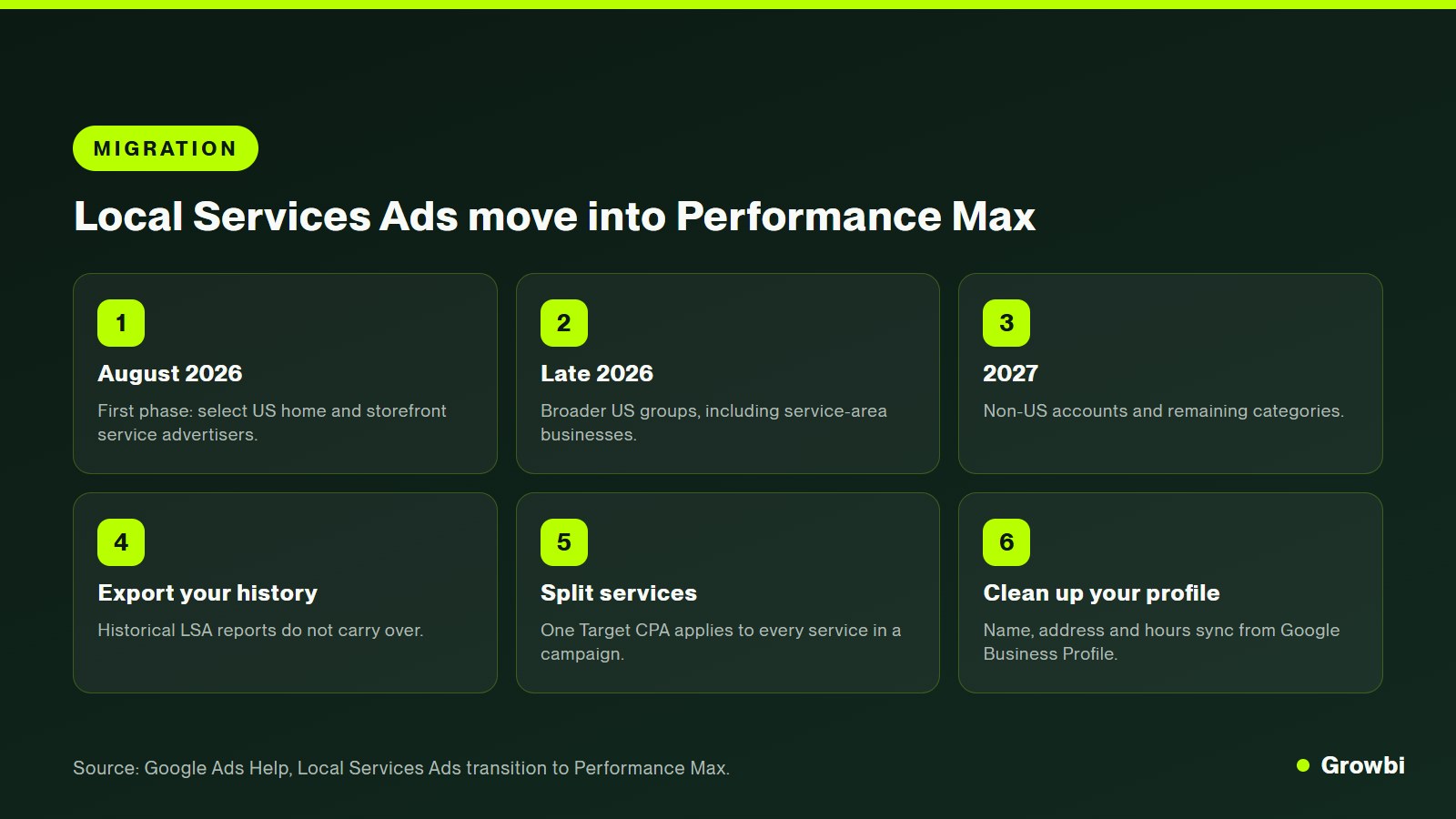
The details are in Google's migration help article. The first phase began in August 2026 with select US home and storefront service advertisers, broader US groups follow in late 2026, and non-US accounts move in 2027.
- Billing. Before: Pay per valid lead; After migration: Pay per valid lead, unchanged
- Where ads show. Before: Search and Maps; After migration: Search and Maps, same positions
- Bidding. Before: Maximize leads, max per lead, or target cost per lead; After migration: Manual max per lead and vertical-level targets retired; one campaign-level Target CPA
- Budget. Before: Weekly budget; After migration: Daily average (weekly divided by 7), monthly cap of daily average times 30.4
- Reporting. Before: LSA dashboard history; After migration: Historical reports do not carry over
- Lead management. Before: LSA dashboard; After migration: Leads page in Google Ads (Goals, Conversions)
- Business details. Before: Edited in LSA; After migration: Synced one way from Google Business Profile
Source: Google Ads Help
Do three things before your migration email arrives. Export or screenshot your lead and spend history, because it will not move. Split services with very different lead values into separate campaigns, since one Target CPA will apply to everything in a campaign. And clean up your Google Business Profile, because name, address and hours will sync from it.
How Google Ranks Local Services Ads
Three groups of signals decide your position, and only one of them is money.
Google's About ad rankings page lists them as your bid, the likelihood that you will get a lead, and the quality of your profile.
- Your bid. The most you are willing to pay for a lead. Higher bids help, but they do not override the other signals.
- Likelihood of a lead. How responsive you are to customer inquiries, what the customer searched for and how relevant your business is.
- Profile quality. Rating, number of reviews, average response time, high-quality photos and completed verification checks.
Distance matters less than many guides claim. In 2024 Google removed proximity from its listed ranking factors, and its Ads Liaison said a business's location is often not a key indicator of relevance. Reviews and responsiveness are the levers you control every day.
How to Set Up Local Services Ads Step by Step
New campaigns are still created at g.co/localservices, even for advertisers whose existing campaigns have migrated. This is the order we follow for home service clients.
Verification usually takes the longest, so start it first.
- Clean up your Google Business Profile. Exact business name, address, hours, service area and categories. After migration these details sync from your profile, and big changes can pause the campaign for 24 to 48 hours.
- Start verification. Sign up at g.co/localservices, choose your service categories and complete the license, insurance and background checks Google requires for your trade and state.
- Pick only the job types you want. Turn off job types you do not do or do not want at LSA prices. Google no longer credits leads for job types or areas you do not serve, so the settings must be right.
- Set hours you can actually answer. Match the ad schedule to the hours a person picks up the phone. With missed calls now billable, an unstaffed hour is the most expensive hour in the account.
- Choose a bid strategy and a realistic budget. Start with Maximize leads or a target cost per lead, and fund at least 10 leads a week, which Google recommends for best results. Give the model about two weeks before judging it.
- Load photos and ask for reviews. Upload real job and team photos and request a review after every completed job. Rating and review count feed both ranking and conversion.
- Rate every lead and track it to a booked job. Rate leads in the dashboard or Leads page and log each one in your CRM with its outcome, so you know cost per booked job, not just cost per lead.
How to Choose the Right Bidding Strategy
For most accounts, start automated and switch to a target only once you have outcome data.
Google's bidding guide for Local Services Ads recommends Maximize leads, and says providers using it with equal quality and budgets typically get more leads than those who do not.
Use a target cost per lead once you know what a booked job is worth and how often leads book. After migration, a single Target CPA applies per campaign, so a business offering both drain cleaning and full water heater installs should split them. Otherwise the cheaper service sets the bid for the more valuable one.
How to Get Credit for Bad Leads
Credits are now mostly automatic. Google reviews leads with its own models and credits those it considers invalid, such as spam or wrong numbers, without a manual dispute.
Two changes matter. Leads for job types or locations you do not serve are no longer credited, so wrong settings cost money. And rating your leads still matters, because feedback is the main signal you can give Google when its model misses an invalid lead. Search Engine Land covered the switch when Google automated lead credits.
Local Services Ads vs. Google Search Ads
Most growing home service companies run both. LSA takes the top position and the trust of the badge for urgent, high-intent searches, while Search ads give you control over keywords, landing pages and the services LSA does not cover well.
- Emergency repairs, same-day calls. Better fit: Local Services Ads; Why: Top position, call button, verified badge
- High-ticket installs and replacements. Better fit: Search ads; Why: Dedicated landing page and qualifying form
- A specific offer, such as a $99 tune-up. Better fit: Search ads; Why: LSA has no ad copy for offers
- Limited office hours. Better fit: Search ads with forms; Why: Forms wait for you; missed LSA calls may now be billed
- New business with few reviews. Better fit: Search ads first; Why: LSA ranking leans on rating and review count
Judge both on the same scoreboard: cost per booked job. Our guide to choosing a Google Ads agency for home services explains how to set that up across both formats.
How to Turn LSA Leads Into Booked Jobs
Answer the phone. It sounds obvious, but it is now a cost issue, a ranking issue and a revenue issue at once.
- Measure your answer rate for one week. Every missed business-hours call over 20 seconds may now be billed.
- Route calls to a phone that rings with a backup person or answering service, not to a voicemail box.
- Reply to messages within minutes. Google lists average response time as part of profile quality.
- Text back every missed call automatically and call again within 5 minutes.
- Book on the first call. Have availability in front of the person answering, not a promise to call back with a time.
This is the same principle behind our HVAC leads guide: the source of the lead matters less than what happens in the first five minutes.
Roofers see the same effect on high-ticket jobs. Our roofing lead generation guide shows how one $100 lead can cost $286 or $667 per inspection depending only on callback speed.
Mistakes That Make Local Services Ads Expensive
- Leaving ad hours wider than phone coverage. Missed calls during those hours can now be billed.
- Keeping every job type switched on. Leads for services you do not want are charged and no longer credited.
- Never rating leads. Feedback is the main input you give Google's credit system.
- Mixing cheap and expensive services in one campaign after migration, where one Target CPA applies to all of them.
- Ignoring reviews. Rating and review count shape both your position and whether the homeowner calls you.
- Judging the channel on cost per lead. Track booked jobs and revenue instead.
If you would rather hand this to a team, read what to look for in a home service marketing agency before you sign anything.
You can also see how our home services marketing combines Local Services Ads, search campaigns and fast follow-up into one system judged on booked jobs.
FAQs
What are Google Local Services Ads?
Google Local Services Ads are pay-per-lead ads for local service businesses that appear at the top of Google Search and in Google Maps. Customers can call, message or book directly from the ad. Businesses that pass Google's screening show a Google Verified badge, and they pay only for valid leads instead of clicks.
How much do Google Local Services Ads cost per lead?
Google publishes no official figure. Tracker data compiled by Vendasta in October 2026 put the average home services cost per unique lead at $62.88, with electrical around $43, HVAC around $61, plumbing around $67 and roofing between $79 and $107 depending on the source. Your price depends on trade, city, season and competition.
Does Google charge for missed calls on Local Services Ads?
Since October 1, 2026, Google can charge for missed calls received during business hours when the caller stays on the line for more than 20 seconds. If your phone menu requires a key press, the timer starts after the key is pressed. Repeat contact with the same person within 15 days is charged only once.
Are Local Services Ads moving to Performance Max?
Yes. Google is moving Local Services Ads into Google Ads as Performance Max campaigns with pay-per-lead goals. The first US phase began in August 2026, broader US groups follow in late 2026 and non-US accounts in 2027. Billing stays per lead and ads still show on Search and Maps, but bidding, budgets and reporting change.
Conclusion
Local Services Ads put your business at the very top of Google for the searches that turn into same-day jobs, and you pay per lead rather than per click. In 2026 they also became stricter: missed calls can be billed, credits are automatic, and bidding is moving into Performance Max.
The businesses that win on LSA are the ones that answer. Fast responses and steady reviews raise your ranking, lower your cost per booked job and protect you from paying for calls nobody picked up.
If you want your Local Services Ads judged on booked jobs instead of leads, book a free strategy call and we will review your account with you.
Get this system built for your business
Book a strategy call and we will model a realistic appointment target from your budget, market, and offer.
Keep reading

Best Google Ads Agency for Home Services
HVAC Leads: Where to Get Them, What They Cost and How to Choose a Provider

Roofing Lead Generation: How to Get Leads That Turn Into Booked Inspections
Why Choose a Home Service Marketing Agency
Are Angi Leads Worth It? An Honest Cost Breakdown for Contractors