Dental Video Marketing: Low-Budget Videos That Win Trust

Key Takeaways
- Start with six video types: practice tour, meet the dentist, first visit, treatment explainers, a patient story and an emergency clip.
- Keep most videos between 30 seconds and 2 minutes, and add captions to every one of them.
- A phone, a clip-on microphone and window light are enough to start, because sound matters more than the camera.
- Get written authorization from patients and staff before filming, and judge videos by bookings and no-shows, not views.
Dental video marketing works because dental anxiety is visual. Six core videos cover most needs: a practice tour, a meet the dentist introduction, a first visit walkthrough, two treatment explainers, a patient story, and an emergency clip. Film them on a modern phone with a clip-on microphone, then publish them on treatment pages, your Google Business Profile, and social.
Nervous patients are not reassured by adjectives. They are reassured by seeing the door they will walk through, the chair they will sit in, and the face of the person who will treat them. Video is the cheapest way to deliver that, and many practices still do not have it.
Why video works for nervous dental patients
Video lets potential patients see a dental visit before they commit to one, and seeing is how nervous people build trust.
In Wyzowl's 2026 survey of 266 marketers and consumers, 63% of consumers said a short video is how they would most like to learn about a product or service. Only 12% picked reading an article.
The same survey found 96% of people have watched an explainer video to learn about a product or service, and 85% have been convinced to buy by watching one. For a practice, the product is the visit itself.
Video also does a job your front desk cannot do at 10pm. It answers 'what will it feel like?' before prospective patients have spoken to anyone, and that question stops many of them from booking.
Six videos every dental practice should own
Build a small library first, then add to it. These six cover the questions new patients ask before they book.
- Practice tour. Length: 60 to 90 seconds; Where it works hardest: Homepage, new patient page, Google Business Profile
- Meet the dentist. Length: 60 seconds; Where it works hardest: Team page, ads, social
- Your first visit. Length: 90 seconds; Where it works hardest: New patient page, booking confirmation email
- Treatment explainer. Length: 45 to 60 seconds each; Where it works hardest: The matching treatment page
- Patient story. Length: 60 to 120 seconds; Where it works hardest: Treatment pages, retargeting ads
- Emergency and out of hours. Length: 30 seconds; Where it works hardest: Emergency page, Google Business Profile
Start with the first-visit video. It speaks to the most anxious patients, and the same clip works on the new patient page, in confirmation emails and as an ad.
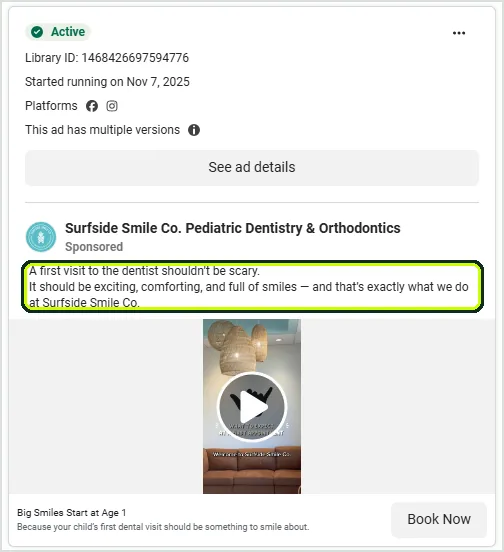
Surfside Smile Co., a pediatric practice, runs that idea as a Meta ad. The copy opens with 'A first visit to the dentist shouldn't be scary' over a vertical video of the office, and the Ad Library shows it live since November 7, 2025.
Filming on a phone without a production budget
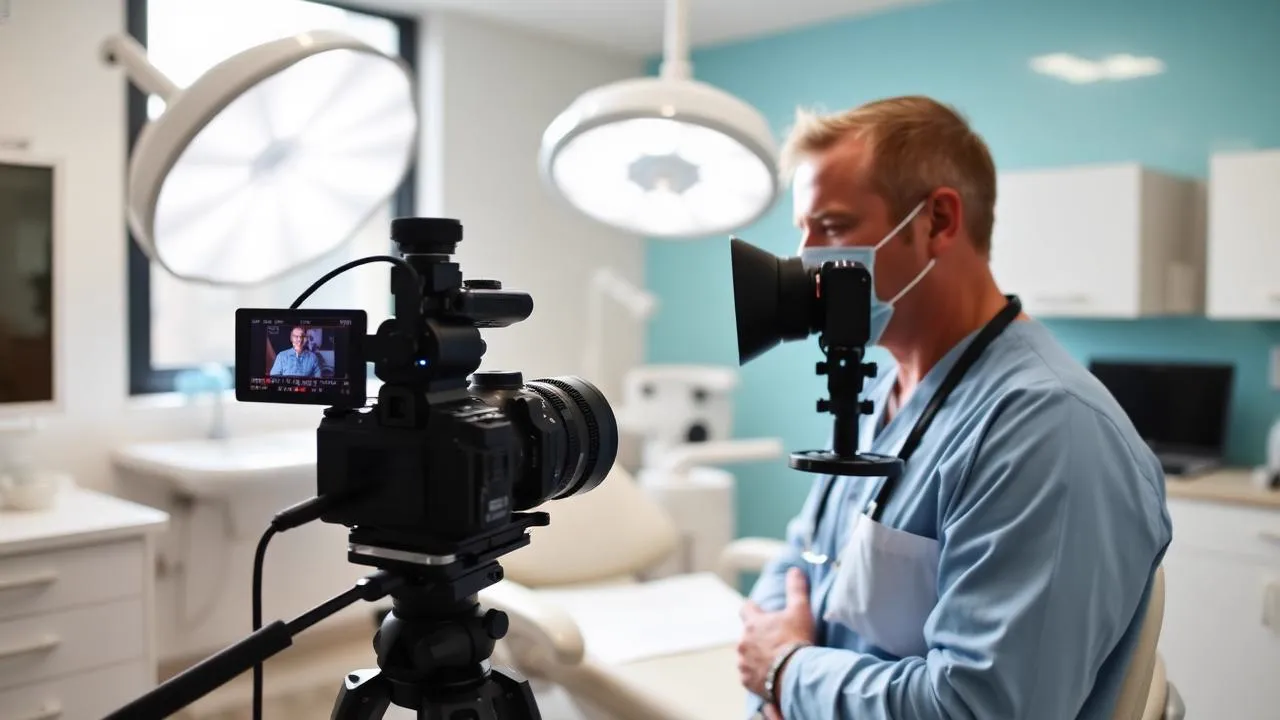
You do not need a studio or a video production company to start. You need clear sound, soft light and a filming hour on the calendar.
- Fix the audio first. A clip-on microphone makes more difference than any camera upgrade. Viewers forgive soft images, not muffled sound.
- Use a window. Face natural light, put the phone at eye height on a small tripod, and avoid overhead clinical lighting on faces.
- Script the first sentence only. Open with the question the patient actually asks, then speak normally. Fully scripted dentists look uncomfortable.
- Film in short takes. Ten seconds at a time, edited together, is far easier than a perfect single take.
- Add captions. Plenty of social video plays with the sound off, and captions help patients who are deaf or hard of hearing.
- Keep a filming hour. One hour a month, batch six clips. Videos die from scheduling, not from difficulty.
The equipment you need
Everything on this list fits in a drawer at the front desk, and the phone is already in your pocket.
- A recent smartphone that films in 4K or 1080p.
- A clip-on (lavalier) microphone that plugs into the phone.
- A small tripod with a phone mount.
- An editing app that adds captions.
- A quiet room at a quiet time of day, such as before the first patient.
Bring in professional video production later, for one flagship practice film, once you know which videos patients actually watch. In dental video content, honesty beats polish.
How long dental videos should be
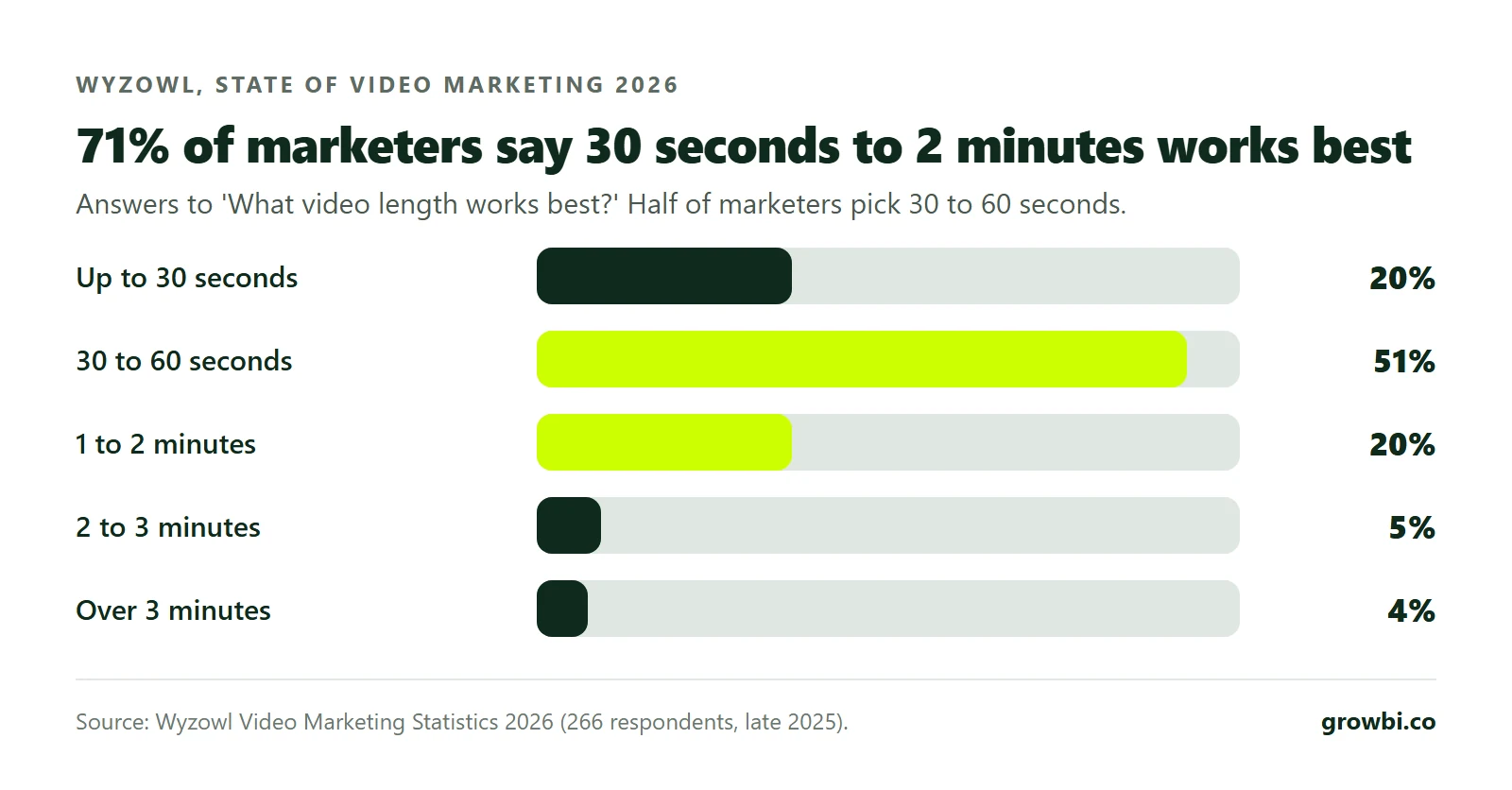
Short. Most patient questions deserve an answer under two minutes, and many deserve one under 60 seconds.
In the same Wyzowl survey, 71% of marketers said videos between 30 seconds and 2 minutes work best: 51% picked 30 to 60 seconds and 20% picked 1 to 2 minutes.
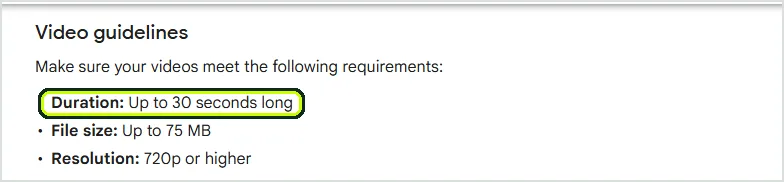
Google sets a hard limit on one channel. Videos on a Google Business Profile run up to 30 seconds and 75 MB, at 720p or higher.
So cut a 30-second version of your tour and emergency clip for the profile, and keep the longer cuts for YouTube and your website. If a topic needs more time, split it into several short videos.
What a dental video script should include
Script the structure, not every word. Five beats are enough for almost any treatment explainer or patient question.
- The patient's question, in their words: 'Does a root canal hurt?'
- A short, honest answer in plain language, without promising an outcome.
- What actually happens, step by step, in the room.
- Who they will meet, by name.
- One next step: 'Book a consultation using the button on this page.'
Consent rules for patient and staff videos
A patient on camera in your marketing is protected health information, so written authorization comes before filming.
The HIPAA Privacy Rule requires a covered entity to obtain an authorization for any use or disclosure of protected health information for marketing, with narrow exceptions (45 CFR 164.508). Name the platforms in the form and make it revocable.
Staff should consent to appearing in marketing too, and those records belong with your other marketing consents. Never film a screen, chart or schedule that shows patient information, and never record patient testimonials before the form is signed.
Where to publish each video
Film once and publish everywhere. Each channel needs a different cut of the same clip, not a new shoot.
- Embed the right explainer on each treatment page, below the first booking action rather than above it.
- Upload 30-second cuts of the practice tour and emergency clip to your Google Business Profile.
- Post longer versions to YouTube, used by 84% of U.S. adults and 65% of those 65 and older.
- Post vertical cuts to Instagram and TikTok, reusing the same clip rather than filming twice.
- Attach the first visit video to booking confirmation emails to help reduce no-shows.
- Use the meet the dentist clip as retargeting creative for people who visited but did not book.
The YouTube figures come from Pew Research Center's 2026 fact sheet, and one detail stands out: YouTube reaches more adults 65 and older than Facebook does, 65% against 59%. Longer explainers for older patients belong there.
Video works best inside a full system. Pair it with the weekly posting plan in our dental social media marketing guide, and embed it on pages built like the ones in our dental website design guide.
Using video in dental ads
Your organic videos make strong ad creative because they look real. A dentist talking to camera beats a stock smile.
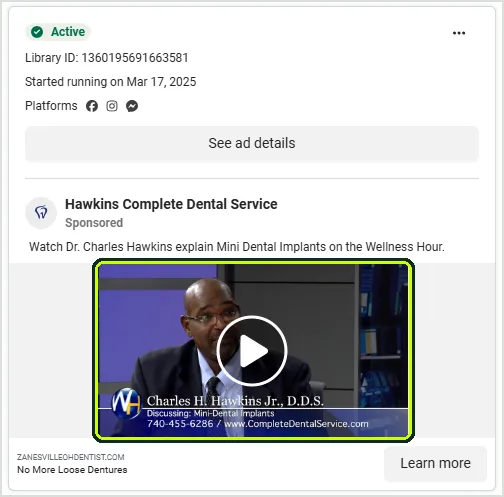
Hawkins Complete Dental Service runs a clip of its dentist explaining mini dental implants, headlined 'No More Loose Dentures'. The Ad Library shows it live since March 17, 2025 and still active in October 2026.
Use the meet the dentist clip to retarget people who visited your website but did not book. Use a treatment explainer for cold audiences on Meta, cut to vertical with captions, and keep every claim as careful as on your website.
Any Meta ad, video or not, needs follow-up behind it. Five-minute callbacks plus SMS reminders are what turn ad leads into booked consultations and started treatment.
Our comparison of Google Ads vs Facebook Ads for dentists covers where video ads fit. To see what a video campaign would cost in your area, book a free 15-minute call.
Measuring dental video marketing by bookings
Views are the weakest signal. Measure what video changes at the front desk: bookings, show rates and ad costs.
- Booking rate of treatment pages with video against pages without.
- No-show rate for new patients who got the first-visit video in their confirmation email.
- Cost per booked consultation for ads with face-to-camera video against static images.
- New patients who mention a video at intake.
Tracking results to booked and attended appointments, not clicks, is the core of how we run dental marketing. A strong show-up rate comes from that follow-up, not from the ads alone.
FAQs
Do I need a professional videographer?
Not to start. A modern phone, a clip-on microphone, a small tripod and window light produce videos that build trust. Consider a professional shoot later for a flagship practice film once you know which videos patients actually watch.
Does video help dental SEO?
Indirectly. Video keeps visitors on treatment pages longer and helps them decide to book, and photos and videos make your Google Business Profile more complete. It is not a ranking shortcut on its own.
How often should a dental practice post videos?
One filming hour a month that produces six short clips gives you more than one video a week to share across Instagram, Facebook, YouTube and your Google Business Profile. A steady pace beats bursts of activity.
Conclusion
Dental video marketing works because it lets patients see the room, the chair and the dentist before they book. That removes a kind of fear that text cannot reach.
Start with six videos filmed on a phone, keep them between 30 seconds and 2 minutes, and get written authorization before anyone appears on camera. Then publish each one where patients make the booking decision.
If you want to know which videos and ads would add the most booked appointments for your practice, book a free 15-minute call and we will map it out with you.
Mor Romano
CTO, Growbi
Written and fact checked by Mor Romano, published , last reviewed .
More about Mor RomanoGet this system built for your business
Book a strategy call and we will model a realistic appointment target from your budget, market, and offer.